
This is going to be very transparent and straight to the point. I give you heads up that, this post is going to be long so you can bookmark it and come back later to read it or just read along if you are really into getting a brand identity and exposure. Before that I am happy to inform you guys that my new company (Internet Marketing Agency with Cyber Security Solutions) has been successfully launched and it's doing great already. I think it;s because I already had my contacts and branding. Woo this can be a great live example (trust me didn't think of it before writing this post). I have a website since way long and I have my personal branding done.

It's basically 7+ years. So I have used all social sites and analysed what works best for me. If you could use all then that's better but I just use tools and stuff to stay active on least preferred and I manually post from A-Z when it comes to my most preferred sites because I want to throw in some personal touch to it. Coming back to the point, I already have a brand that's build up from scratch so starting my 3rd or 4th company from scratch won't be an issue. For instance, it's hardly couple of days and I already got 1000 followers on IG just because I told my friends on main account that there's my new business go follow it if you are interested. Boom! As simple as that.
So, to build that rapo you need to know these 5 tips on each
of the leading platforms that I am going to discuss with you today. I have
reached entire internet and there is no article that has a cumulative one piece
(more like an ultimate guide I should say) which lists out everything you need
to know about any social site. After reading this, put it into practise. If you
already have social accounts then modify it according to the suggested tips. If
not, then make an account and go for it. Make the most out of this FREE guide
built just for my audience. And if you would like to thank me then share it
with your friends. That would be enough.
Google+ for Business
1) Google+ Hovercard for
embedding
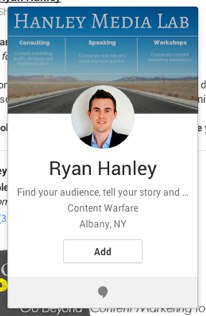 You must have come across that G+ profile banner especially on
Blogger (because it is integrated) or added one onto your site. Every marketer
wants to grow their business on Google+ thinking that Google will favour the
news and articles that hit on G+ first and then offering other sites. I
should kinda admit that, although their might be potential customers to your
business but that will be rare. But on the other hand consider it like LinkedIn
because the people you network here with will be gold.
You must have come across that G+ profile banner especially on
Blogger (because it is integrated) or added one onto your site. Every marketer
wants to grow their business on Google+ thinking that Google will favour the
news and articles that hit on G+ first and then offering other sites. I
should kinda admit that, although their might be potential customers to your
business but that will be rare. But on the other hand consider it like LinkedIn
because the people you network here with will be gold.
Unfortunately, many of them are getting overwhelmed trying
to keep their Google+ stream filled with fresh content in the hopes this will
attract +1’s, reshares and new connections. Trust me that's not how G+ works.
They are making one big mistake. The most effective way to grow your audience
on G+ focus on commenting.When you scroll over any other users name a hover
card will appear. Enter relevant terms in the search bar. The results will
return G+ users, collections, public posts, communities etc. Add them to
your circle right from there and start engaging. Add valuable comments to
the public posts.
The Key is not about you finding people but making people
find you. From your comments in these locations, users can simply hover over
you name and add you to their circles.
2) Schedule Posts:
When you find great content you want to share, it doesn’t
make sense to share it all at once. Instead it’s better to add it to a queue
and share at an appropriate time. There's a Chrome plugin( Not gonna name any
particular one since I don't endorse products) which is free. That allows
you to share content at a time that suits your audience.
But the only limitation about Google is that you need to
have your Chrome browser open at the time you have scheduled the content to be
delivered. This is not a bad thing or else there would be N-Number of bots on
Google too.
3. Disable Comments to Increase Engagement:
When someone has comments on a post, they will receive a
notification each time someone comments on it. Using this method you can
have ‘the last word’ on your comment threads. That is one of the beauty
about G+, you have a lot of control as of who you engage with you. After having
the last work, simply click on the upper right of one of your posts and
‘disable comments’.
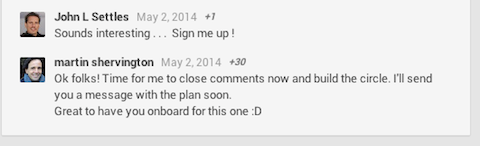
There is an example by martin: He called it a deal and the
rest, who would like to know more, will have to reach out to him so again you
get a good following. Mention why you have closed off comments. Ask them to
redirect to your desired location.
4. Show-casing Image
4. Show-casing Image
I know this is not Instagram but images speak up for a lot,
on any social site. So having the right dimension for different platforms in
necessary. Don’t be lazy as many of them do as newbies, allowing G+ to
grab an image from the link you’re sharing.
Instead, go an extra mile and design your own in couple of
minutes. Remember that personal touch? The most popular dimension on G+ is tall
and skinny images that are attractive. I would rather suggest you to
create infographics too. Make the most out of charts on G+ skinny
functionality. Everyone shares jokes, animated gifs, quotes, etc.. but
only a handful of people are turning statistics into images that are easy to
digest.
5. Claim Authorship using G+ profile:
If you a content writer for various online blogs and
publications, be sure to use your Google+ profile to claim authorship of each
piece of content you write. Regardless of whether you own a website or not,
sign up for Google Webmaster Tools using the same Google account as your G+
profile. This will allow you to see analytics data for the posts linked to your
G+ profile, including impressions in search, CTR etc.
Since you generally don’t get analytics data
for the content you write on sites other than your own, this can give you a
little insight on the popularity of your content in search.
These are directly inserted from my famous IG guide post
that I published a week before.
1. Timing is everything matters:
Even with 200 million+ users, there are still popular times
that more users are engaged with their account. Unfortunately, there is not a
magical time to post, but many studies have shown that posting a picture
between 9am and 9pm EST is likely to get the best results. I have
analysed these results personally since 2011 and I have seen great... great
results. The most users are typically engaging with their Instagram account
from 3-4 EST. Doesn't matter which part of the world you are from.
The timing should depend on your niche and targeted audience i.e. the country
in this case.
Let's say I want to pitch a sports product to players in
south Africa so it's bit obvious that I will build my brand around it but I
will make sure that I post in peak times of south African timing standards.
Same goes with India, United states and so on. Because it goes without saying
that you don't expect people to be awake at 3AM waiting for your post just
because your time zone is different and you post at your convenience. It's like
either you caught their eye or you did not.
2. Share variety of content:
While your ultimate goal is to sell your product, don’t just
post sales information. Users want to relate to you on their level, so use
Instagram as a chance to give them a glimpse of what exactly your
company is, add a face to the people behind the brand.
Interact with them.

If you can't personally revert back then hire someone. Don't stop yourself from showcasing what exactly your brand is about. Just dive! Check out my post below, that's one variation that I added out recently.
If you can't personally revert back then hire someone. Don't stop yourself from showcasing what exactly your brand is about. Just dive! Check out my post below, that's one variation that I added out recently.
3. Hashtags!!:
What's IG without hashtags LOL. While it might seem strange,
hashtags actually have a significant impact on the success of the content you
post. Instagram is a tool to search and engage with new content that is
interesting. Utilizing the hashtag allows you to connect with unconnected
users. But #Don't #Do #This #Because #Its #Useful #Only #On #certain #Tags #
Like : "#Picoftheday" so choose your hashtags wisely.
4. Post videos
The Instagram video function has become more popular than
the video posting app, Vine. Not only are videos fun to post but they engage
users. Not a fan of videos? well let me tell you that people engage more on
videos than on photos. It doesn't have to be a epic production. It can be
something like
____________________________________________________________________
Hey, come say hi
to me on Instagram.
Let's talk about growing your business
____________________________________________________________________
5. Use Filters:
One of Instagram’s best features is that users can instantly
turn a simple iPhone photo into a high quality piece of art with the handy
editing tools, but choosing the right filter can increase or decrease the
number of likes you receive. But don't hesitate use the best finish that you
find.
People are drawn to photos with blue tints, over red or orange images and light photos are generally more popular than dark photos. The top 3 most effective filters are Normal or No Filter, Mayfair and Inkwell. But don't be afraid to post a no filter picture one a while. Sometimes simplicity is the key. Oh, make sure to add #NoFilter hashtag when you do ;) That's one of my no filter share...

Facebook
People are drawn to photos with blue tints, over red or orange images and light photos are generally more popular than dark photos. The top 3 most effective filters are Normal or No Filter, Mayfair and Inkwell. But don't be afraid to post a no filter picture one a while. Sometimes simplicity is the key. Oh, make sure to add #NoFilter hashtag when you do ;) That's one of my no filter share...

According to stats, Facebook said around 88 million people in the U.S. spent approximately $14.3 billion with small businesses during the 2014 version of American Express. So it’s already up there. Here are 5 business tips to incorporate the social network into their efforts.
1. Try local Ads:
I wouldn’t have realized it’s potential unless and until I tested the power of FB Ads a month ago. It wasn’t my favorite platform to mark before that but the lovely insights and the targeting control makes it easy-peasy. And there are lot of benefits to it. I see that the engagement ratio has been boosted all by itself even though I stopped the AD. If needed setup the local business page or a page relevant to your category and make the most of it.
2. Use the right call-to-action buttons:
There’s only one place on your page where people really want to click through and that’s this call to action button. Use it as a lifeline to external site. Yep, there is a website site placement option in about section as well the linked posts that we make? But nothing is as efficient as this page buttion. Different options fit different businesses, so choose wisely when deciding between “Call Now,” “Send Message,” “Contact Us” or other available alternatives.
3. Set up a saved reply:
This basically comes under the message enabling system on page. I personally feel it’s definitely a plus point for businesses as well as customers. Go on to your messenger settings on the page that you are managing, select “Saved replies” and type in an appropriate message. This allows page administrators to more easily deal with high volumes of messages by creating templates for frequently asked questions. Welcome to the world of automation Haha
4. Monitor stats and insights:
1. Try local Ads:
I wouldn’t have realized it’s potential unless and until I tested the power of FB Ads a month ago. It wasn’t my favorite platform to mark before that but the lovely insights and the targeting control makes it easy-peasy. And there are lot of benefits to it. I see that the engagement ratio has been boosted all by itself even though I stopped the AD. If needed setup the local business page or a page relevant to your category and make the most of it.
2. Use the right call-to-action buttons:
There’s only one place on your page where people really want to click through and that’s this call to action button. Use it as a lifeline to external site. Yep, there is a website site placement option in about section as well the linked posts that we make? But nothing is as efficient as this page buttion. Different options fit different businesses, so choose wisely when deciding between “Call Now,” “Send Message,” “Contact Us” or other available alternatives.
3. Set up a saved reply:
This basically comes under the message enabling system on page. I personally feel it’s definitely a plus point for businesses as well as customers. Go on to your messenger settings on the page that you are managing, select “Saved replies” and type in an appropriate message. This allows page administrators to more easily deal with high volumes of messages by creating templates for frequently asked questions. Welcome to the world of automation Haha
4. Monitor stats and insights:
Remember the test AD, that we run? Well, you are not going to leave it as it is. Take a step further and have a look at the report that’s automatically generated. See when were the most clicks, which type of AD Works great for you. Take a deep look into local insights which provides access to aggregate demographics and trends associated with nearby users, even allowing business owners to zero in on the optimal times of day to reach potential customers.
5. Turn on page messaging:
As I mentioned before, speed is the key to digital media. More the spontaneous reply, better will be your chances of bagging a client. Page messaging allows small businesses to concisely answer questions about their offering or special events in general.